Hen Do Planning Spreadsheet: How to Keep Track of Everything


Planning a hen do is a bit like running a small, very fun, very chatty project. There are dates to agree, deposits to chase, a group chat that never stops and a nearlywed who just wants it all to feel effortless.
A hen do planning spreadsheet is the simplest way to keep every detail in one place, so nothing gets lost down the chat and everyone knows what’s happening.
Whether you’re the maid of honour keeping tabs on payments from a big group or a bridesmaid sharing the load, this guide walks through what to put in your hen do planner, tab by tab, with tips for splitting costs fairly and keeping the whole group in the loop.
It works for a weekend abroad, a night in town or a cosy cottage stay.
Download our hen do planning spreadsheet!Why use a spreadsheet to plan a hen do?

Group chats are brilliant for banter and not so brilliant for record-keeping. Who’s in, who’s paid and what’s booked all get buried under photos and voice notes within a day. A shared spreadsheet gives you one place to look.
It does a few things a chat can’t. It shows the whole budget at a glance, makes it clear who has paid without anyone having to ask awkwardly, and keeps the plan for the weekend somewhere everyone can find it, instead of scrolling back through the chat for the address of the house.
It’s also free, works on every phone and needs nothing more than Google Sheets or Excel online. Set it up once, share the link and you’re away.
What to include in your hen do planning spreadsheet
Keep it simple. One spreadsheet with a handful of tabs is easier for everyone to use than one giant sheet with 30 columns. Here are the tabs we’d start with:
- Overview
- Guest list and RSVPs
- Budget and payments
- Itinerary
- Bookings and accommodation
- Checklist
Before you build anything, have a quick chat with the bride-to-be, or her partner or closest friend if it’s a surprise, about the basics: who she’d love there, roughly what the group can spend, which dates work and anything she definitely does or doesn’t want. Those answers shape every tab that follows.
Download our hen do planning spreadsheet!The overview tab
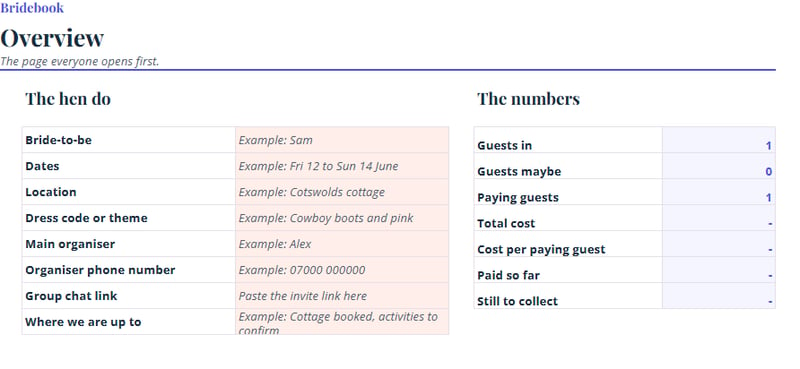
This is the page everyone opens first, so make it count. Add the dates, the location, the dress code or theme, the name and phone number of the main organiser, and the link to the group chat. Pin a short line on the plan so far, such as “Cottage booked, activities to be confirmed by 14 November”. If someone asks a question that’s answered here, you can simply point them to the tab.
The hen do checklist tab
A hen do checklist is the running to-do list for the organiser. Give each job a name, an owner, a deadline and a simple status like to do, in progress or done.
Typical jobs include agreeing a budget, collecting deposits, booking the main activity, arranging transport, ordering any matching outfits or accessories and sending the final details to the group a week before.
Assigning an owner is the clever bit. When two bridesmaids can each see that “book the restaurant” belongs to someone else, you avoid the classic double booking and the equally classic “I thought you were doing it”.
How to track your hen do budget and payments

Money is the part of a hen do most likely to cause stress. The question organisers ask most is how to keep track of who has paid what and how to chase it, especially when you don’t know everyone in the group very well.
A spreadsheet takes the awkwardness out, because the sheet does the remembering. Chasing is part of the job, but a clear system makes it feel routine rather than personal.
The simplest set-up has three parts that talk to each other.
1. An overview sheet for each guest. One row per person, with their name, the total they owe, the amount they’ve paid, what’s still due and the deadline. This is the page you’ll check most and the one you can share with the group.
2. A cost breakdown. Next to each name, add a column for each cost: accommodation, travel, activity one, activity two, a food and drink kitty and any extras. The total owed is the sum of those columns, so if two guests are only coming for one night, their total will be lower without any fuss.
3. A payments log. Every time money arrives, add a row with the date, who paid, how much and how. Then link it to your overview with a formula so the “paid” column fills itself in. In Google Sheets or Excel, =SUMIF(Payments!B:B, A2, Payments!C:C) adds up everything paid by the name in cell A2. The “still due” column is then just the total owed minus the amount paid.
If different things need paying for at different times, such as a cottage deposit now and an activity balance later, give each item its own sheet with its own deadline, and let the front sheet add them all up. Everyone sees one clear number, and you see what’s coming in when.
A few habits keep the payments tab running smoothly:
- Keep amounts as similar as you can. If everyone pays a different amount, the sheet gets complicated and the group gets confused. Offer optional extras separately instead.
- Set a deadline for each stage, such as a deposit now and the balance a month before, and put the dates at the top of the sheet.
- Choose one person to receive payments, ideally into a separate account or via a payment link, so hen do money doesn’t get mixed up with their own.
- Share the sheet as view-only so guests can check what they owe whenever they like. It saves you answering the same question 20 times.
- Add a notes column, because “paying in two instalments” is easy to forget.
Chasing payments from guests you don’t know well

Asking for money from people you’ve only just met can feel uncomfortable, but it helps to remember that guests expect it. Send one clear message when the plan is agreed, with the total, what it covers, the deadline and how to pay.
Then send a friendly reminder a few days before each deadline, linking to the sheet. A colour code, green for paid and amber for waiting, shows you who to nudge without anyone being named in the group chat.
If you’re keeping the hen do a surprise, you don’t need to involve the bride-to-be at all. Her partner or closest friend can help you with the guest list, and the rest can live in your sheet.
Guest list, itinerary and bookings
The guest list and RSVP tab
List every guest with their name, phone number, email, dietary requirements and any access needs. Add columns for whether they’re in, out or maybe, the date they replied and who’s sharing a room.
If a hen do is mixing friends from different parts of the bride-to-be’s life, a column for “how they know the bride” helps with room and table planning and with icebreakers.
A reply-by date, set a few weeks ahead of your first deposit, stops numbers drifting. Once the list is firm, lock it so the budget tab can count on it.
The itinerary tab
A hen do itinerary template is easy to build. Create a row for each time slot, split by day, with columns for the activity, the location, the address, the cost, the booking reference and any notes such as dress code or what to bring. Add travel times between each stop so you don’t plan a 3pm spa session 40 minutes from a 3.15pm lunch.
Build in downtime. The best hen dos have breathing room between the big moments, and a slow brunch is often what people remember. If you need inspiration for what to fill the days with, our hen party ideas are a good place to start.
The bookings and accommodation tab
This one is your safety net. For every booking, record what it is, who made it, the date, the confirmation number, the cost, the deposit paid, the balance due date and the cancellation terms. Paste in the booking link and the host’s or venue’s contact number too.
It may feel fussy at the time, but when you’re standing outside a cottage at 4pm and need the key-safe code, you’ll be very glad you did it. For anything overseas, add flight details, passport and travel-insurance reminders and any transfer times. Our overseas hen do guide covers the extra planning that involves.
Tips for sharing your hen do planner with the group

Share the sheet as view-only for most guests, with edit access for the one or two people running things. That way nobody accidentally deletes a row, and guests can still check the plan whenever they like. Let people fill in their own RSVP and dietary details in a separate tab, or use a short form that feeds the sheet.
Pin the link at the top of the group chat and use the chat for conversation and the sheet for facts. If a decision is made in the chat, add it to the sheet the same day. Keep to one version, too, because three slightly different copies cause more chaos than no spreadsheet at all.
Finally, keep it kind. Not everyone has the same budget or the same free weekends, and a gentle, clear plan with a few optional extras lets everyone join in on their own terms. For more on keeping the peace, see our hen party dos and don’ts and our guide to a stress-free hen party.
Spreadsheet or app: which is better for planning a hen do?
For most groups, a spreadsheet is the best place to start. It’s free, flexible and familiar, and you can shape it around your own plans. A dedicated hen do planning app can be handy if you want built-in payment reminders or polls, though it usually means everyone has to download something and sign up.
If your group is large, spread across the country or fairly busy, the simplest tool that everyone will open is the right one.
Hen do planning spreadsheet FAQs
How do I plan a hen do from scratch?
Start by talking to the bride-to-be about guests, budget, dates and wishes. Then set up a shared spreadsheet with tabs for the overview, guest list, budget, itinerary, bookings and a checklist, agree a deposit date, and book the biggest items first, usually the accommodation and the main activity.
What should I put in a hen do budget?
Include accommodation, travel, food and drink, activities, decorations and outfits, plus a small buffer. Work out the per-person cost by dividing the total by the number of paying guests, and decide upfront whether the group is covering the bride-to-be’s share.
How far ahead should I start planning a hen do?
There’s no single rule, but earlier is easier. Popular dates and venues get booked up, and giving guests plenty of notice makes it much simpler for them to say yes. Overseas trips need longer than a night in town.
How do I collect money for a hen do fairly?
Set clear deadlines, use one payment account or link, and record every payment in your sheet. Being clear about what’s included, and what’s optional, helps guests feel comfortable.
Is it worth buying a hen do spreadsheet template?
It can save time if you’d rather not build formulas yourself, but you don’t need one. A basic sheet with a guest list, a payments log and a total per person covers most hen dos, and it’s easy to adapt as the plan changes. If you do buy one, check it works with Google Sheets so you can share it with the group.
Planning your own wedding too?
Once the hen do is sorted, the wedding planning can begin in earnest. Bridebook is used by 2.8 million couples to find venues and suppliers, build guest lists and keep their planning on track. Take a look and see how it can help you.
Related articles